Create & Format a MarketDirect VDP Product
A
variable print
product
is
a print template for a document such as a postcard, business card,
or flyer that can be either generic (not personalized) or personalized
(for example, with the recipient's name, address, and targeted marketing
messages). Variable print products can contain both static
content (i.e., boilerplate text, logo, images) and variable
fields (i.e., placeholders for the recipient's name, address, etc.).
MarketDirect VDP is MarketDirect StoreFront's
native VDP template designer and artwork generation engine that enables
you to create variable data products your buyers can use to reach their
own customers with personalized direct mail campaigns. Combining MarketDirect
VDP with image personalization and AccuZIP direct mail services results
in a true end-to-end solution for direct mail marketing campaigns.
Spot Colors:
Note that MarketDirect StoreFront
supports all Pantone®
spot color values. The spot colors must be defined in the variable template.
MarketDirect VDP is available as a licensed option.
For more information on obtaining a license for MarketDirect VDP, contact
your sales representative, call
(412)-690-3050, or complete the Web form at https://epssw.com/contact-us.php.
Image Personalization
An image personalization option lets you create templates with personalized
images (images in which you can embed text but as clip fonts so that they
appear fully involved and integrated with the image).

Direct Mail Service
For more information on setting up and managing mailing service providers
such as AccuZIP, see the topic Mailing
Service Providers.
Please note that at the present time mailing service provider integration
will work only with the VDP products).
For additional guidelines on setting up direct mail pieces in MarketDirect
StoreFront, see Direct Mail
Guidelines.
Create an VDP Product
Follow the steps below to create an MarketDirect
VDP product to offer to your buyers.
See Also
● FusionPro
Products
● VDP
Products
● Variable
Data Products - VDP
● Create
Products

 Step
1: Verify that you are licensed for VDP
Step
1: Verify that you are licensed for VDP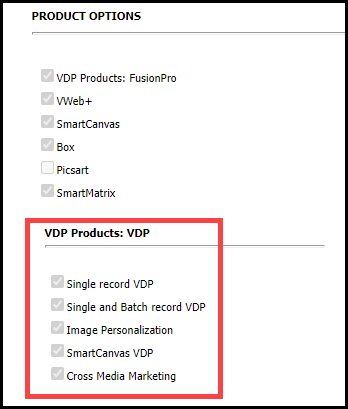

 . After
entering a fixed quantity, click
. After
entering a fixed quantity, click 


 to
expand each field.
to
expand each field.