To use the Login Bypass you must obtain a license for the integration option Authentication Pkg: LDAP and Login Bypass (if the option is licensed, the item will be activated on the License page). For more information see Licensing.
Important: Login Bypass functionality is intended to be used only by advanced users who are proficient in working with Web applications or for sites that have an IT staff capable of configuring and managing it.
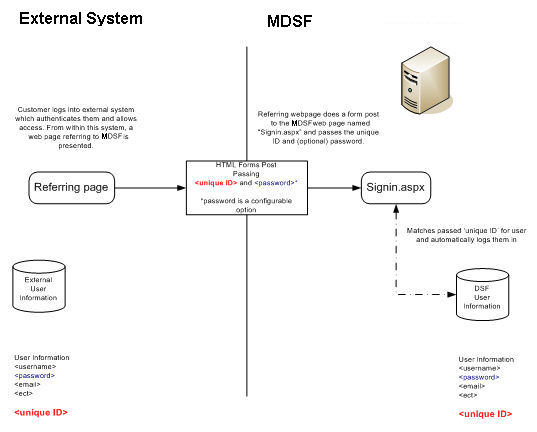
Login Bypass allows different Web sites to redirect to MarketDirect StoreFront without the need for users to login manually. A username and token are sent via a POST request to the MarketDirect StoreFront server. Login Bypass allows for the site home/login page to be bypassed if the referring system passes the authentication information. When a user registers an account, the system will match the account name that the user has entered with the closest name on the account list and apply user group rights, cost center, and associated account status for the specified account.
Site administrators will use login bypass when they want users to be able to bypass the login on the MarketDirect StoreFront home page by passing login credentials from an external system.
Ideal for: Customers without a centralized authentication server such as Active Directory but with multiple websites.
Changes must be made to the external Web sites to integrate a POST form to administrators to manage the user tokens in MarketDirect StoreFront.
To implement login bypass, the database of the user's database must be synchronized with the MarketDirect StoreFront database.
If licensed, the integration option Authentication Pkg: LDAP and Login Bypass will be checked on the License page. For more information see Licensing.
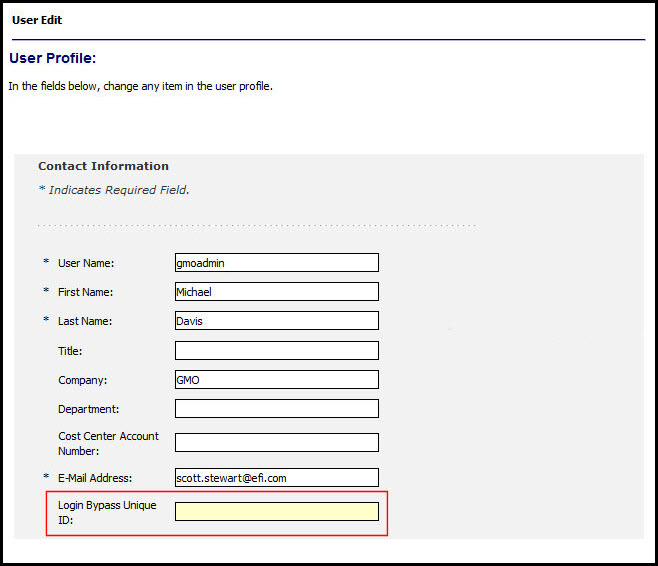
The data structure storing user information in MarketDirect StoreFront now includes a Login Bypass Unique ID field. This field can contain a unique ID value that matches a unique ID value in the customer’s user database(s). When this ID is passed (via form post) to a special MarketDirect StoreFront page (signin.aspx), MarketDirect StoreFront matches the ID to the field in the MarketDirect StoreFront user table and logs in as that user. In addition, the password can be required for an additional level of security. This requirement is configured by setting the PermitEmptyPasswordSSO field in the Web.config file.
The data structure storing user information in the system now includes a Single Sign On ID field. This field can contain a unique ID value that matches a unique ID value in the customer’s user database(s). When this ID is passed (via form post) to the a special page (signin.aspx) which then bypasses the system’s login page; it matches the ID within the system user table and logs in as that user. In addition, a password can be included for an additional level of security. (The PermitEmptyPasswordSSO setting is an entry in the MarketDirect StoreFrontConfiguration table and its values can either be True or False.)
In the initial setup, users must be bulk imported into MarketDirect StoreFront to synchronize the user information between MarketDirect StoreFront and the customer’s external user management database.
Your system must have a Web page that passes the login credentials. The following sample HTML pages illustrate how the customers can modify their systems/web applications to bypass the login with MarketDirect StoreFront.
The referring page must include the SITEGUID in the URL and this SITEGUID must match the SITEGUID in the Administration > Site Settings > About screen. Please see below for a sample referring page which includes this new SITEGUID parameter.
<html>
<body>
<form id=Form1 action="http://server2k/dsf/signin.aspx" method="post">
<input type="text" name="token" id="token" />
<input type="text" name="pwd" id="pwd" />
<input type="submit" value="Submit" />
</form>
</body>
</html>
<html xmlns="http://www.w3.org/1999/xhtml">
<head>
<title>MarketDirect StoreFront</title>
<script language="javascript" type="text/javascript">
function Login()
{
document.getElementById("Form1").submit();
}
</script>
</head>
<body>
<a href="javascript:Login()">LoginByPass</a>
<form id="Form1" action="http://dsfserver/DSF/signin.aspx?SITEGUID=c9c70a5c-95ef-40c9-b5b5-5b2c891d3d84" method="post">
<input type="text" name="token" id="token" value="LOGIN_BYPASS_TOKEN" />
<input type="hidden" name="pwd" id="pwd" value="LOGIN_BYPASS_PWD" />
<!-- Example using blank password below (value="" when not sending password) -->
<input type="hidden" name="pwd" id="pwd" value=" " />
</form>
</body>
</html>
● Bulk upload: Users can be added via bulk import and during regular synchronization with the customer’s user database.
● Self registration can be enabled to allow site visitors to create a user profile themselves. When a user logs in to your site using LDAP single sign-on, a user is automatically created. Administrators can customize registration fields to map with their corresponding LDAP fields.
● Self-registered users will not be able to
use login bypass unless the site administrator edits their user profiles
to include the Login Bypass Unique ID.
In that case, the user must be coming from a referring web page that is
passing login credentials (Unique ID).
When using this login functionality, it is important that the MarketDirect StoreFront user database and the customer's user database be in sync. Users should be updated on a regular basis using the MarketDirect StoreFront bulk import tool (on the Export / Import page).
In some cases, the MarketDirect StoreFront Professional Services team will be able to perform additional services to extend this functionality. Currently, Professional Services will evaluate each proposed Login Bypass implementation to determine the level of effort and required work.
Unless customers are expected to know their user name and password, it is recommended that email notifications be turned off when using this login functionality.
This includes Approval workflows.
User passwords are one-way SHA1 (Secure Hash Algorithm*) encrypted on the MarketDirect StoreFront server. However, some customers may have encryption and security standards for all servers and applications within their environment. It is important to gather any of these possible requirements from customers to ensure that MarketDirect StoreFront can meet their implementation requirements.
Because MarketDirect StoreFront uses a unique page that serves only to lookup the customer ID and bypass the MarketDirect StoreFront home page, security and access to that page can be controlled via Internet Information Server just like any other web application. IP filtering, for example, can be used to ensure that only users of a certain network can access MarketDirect StoreFront.
The customer’s Windows/Domain Login is does not interact in any way with the above functionality. The customer must arrive at MarketDirect StoreFront from another Web page that passes login credentials in order for this to work.
● Site-Level Active Directory Authentication
● Active Directory Services with Federated Identity Services